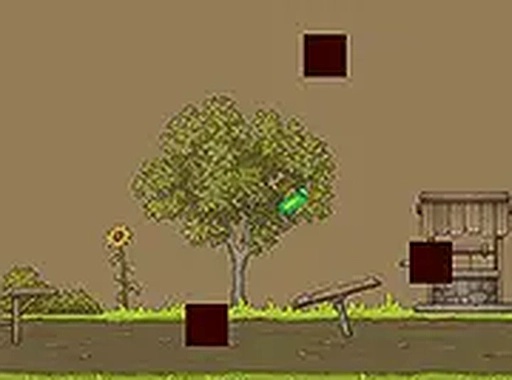
VR Pickle Hunter delivers a clean arcade experience with responsive jumping and well-placed obstacles. Each level feels fresh, and the goal of finding the VR controller adds replay value. The game is easy to learn but offers enough difficulty to keep players engaged. Ideal for short gaming sessions or casual play.
VR Pickle Hunter is an online obstacle game where you take on the role of a pickle on a mission to find the VR controller. Navigate through vibrant levels by jumping across platforms and dodging tricky obstacles. The game is designed for desktop play and offers a simple yet engaging challenge for players of all ages. With its family-friendly content and easy-to-learn mechanics, VR Pickle Hunter provides hours of fun without complex rules. Whether you are a casual gamer or a seasoned player, you will enjoy the thrill of the hunt as you explore each level. Best of all, it is completely free to play on your browser, with full-screen mode available for a more immersive experience. No downloads or installations are needed—just open your browser and start playing.
To play VR Pickle Hunter, use your keyboard or mouse to control the pickle. Press the spacebar or click the mouse to jump on platforms. Avoid obstacles that block your path, as hitting them will end your run. Your goal is to find the VR controller hidden somewhere in each level. The game is designed for desktop computers, so use a keyboard or mouse for the best experience. You can also play in full-screen mode by clicking the full-screen button on the game screen. There are no complicated controls—just jump, dodge, and explore. If you get stuck, try different timing for your jumps to overcome challenging obstacles. Practice makes perfect, and each attempt brings you closer to finding the VR controller.
Fun obstacle dodging keeps each level exciting. Simple platform jumping makes the game easy to pick up. Free browser play means no downloads or installations required. Full-screen mode offers an immersive experience. Family-friendly content ensures safe play for all ages.
To succeed in VR Pickle Hunter, focus on timing your jumps carefully. Observe obstacle patterns before moving forward. Take your time exploring each level to spot the VR controller. Practice regularly to improve your reaction speed. If you fail, learn from the attempt and adjust your strategy.
Funshot.lol is a bright, engaging endless runner with simple aiming mechanics and progressive challenge.
A clever puzzle adventure where you lead a goblin clan to freedom with strategy and teamwork.
Special Strike offers fast action and strategic teamwork. Easy to learn, fun to master.

Clean graphics and smooth controls. Perfect for short breaks. Daily rewards keep it fresh.
Clean visuals and easy controls. A calm, engaging game for quick breaks.

Clean visuals and responsive controls. A solid block breaker with creative level editing.